Agentic Data Stack
The Agentic Data Stack is an open-source, self-hosted stack for agentic analytics built by ClickHouse. It connects a chat UI (LibreChat) to your data (ClickHouse) via MCP, with full LLM observability powered by Langfuse — all deployable with a single docker compose up command.
| Component | Role |
|---|---|
| LibreChat | Chat UI with multi-model support (OpenAI, Anthropic, Google, and more) |
| ClickHouse | Fast analytical database for querying your data |
| ClickHouse MCP | MCP server that gives AI agents access to ClickHouse |
| Langfuse | LLM observability — traces, evaluations, prompt management |
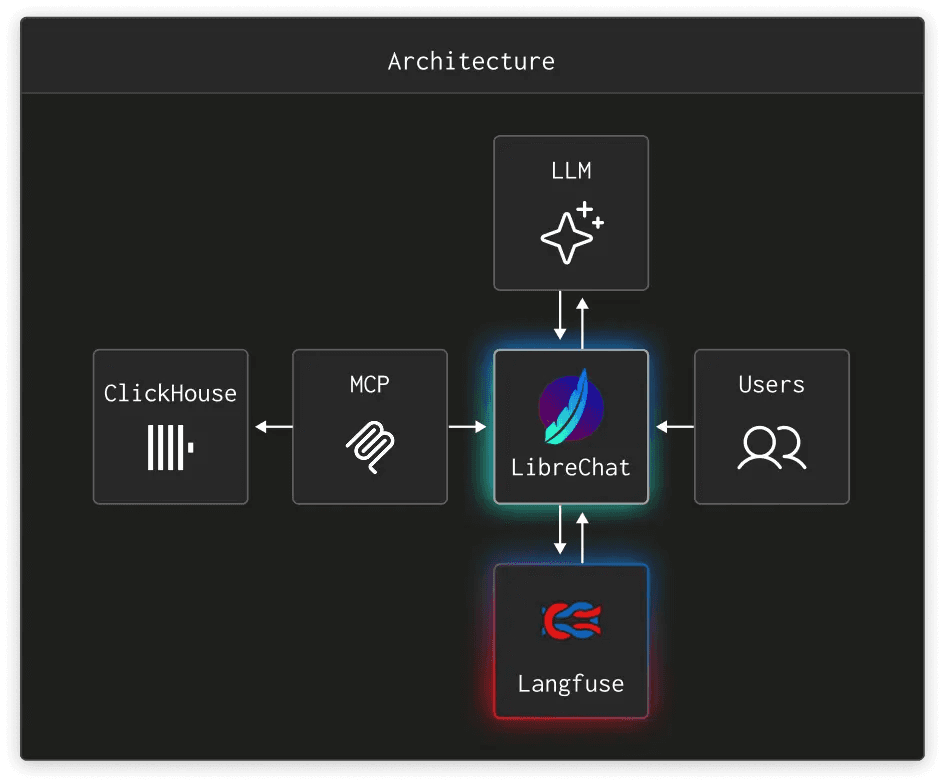
Users interact with LibreChat, which routes prompts to LLMs and queries ClickHouse through MCP. Langfuse captures every LLM call, so you can trace agent workflows, debug issues, and monitor cost and latency.
There are two ways to use Langfuse with the Agentic Data Stack:
- Add Langfuse to an existing LibreChat instance — Connect Langfuse Cloud or a self-hosted Langfuse instance to your running LibreChat deployment.
- Deploy the full Agentic Data Stack — Spin up everything (LibreChat, ClickHouse, Langfuse, and supporting services) from the official Docker Compose setup.
Option 1: Trace LibreChat with Langfuse
If you already have a LibreChat instance running, you can add Langfuse tracing with three environment variables. LibreChat has native Langfuse support built in.
Get Langfuse API keys
Sign up for Langfuse Cloud (or use a self-hosted instance) and create a new project. Copy the public and secret keys from your project settings.
Configure LibreChat
Add the following to the .env file in your LibreChat installation directory:
LANGFUSE_PUBLIC_KEY=pk-lf-...
LANGFUSE_SECRET_KEY=sk-lf-...

# EU region
LANGFUSE_BASE_URL=https://cloud.langfuse.com

# US region
# LANGFUSE_BASE_URL=https://us.cloud.langfuse.com
For self-hosted Langfuse, set LANGFUSE_BASE_URL to your instance URL (e.g., http://localhost:3000).
Restart LibreChat
docker compose down
docker compose up -d
View traces in Langfuse
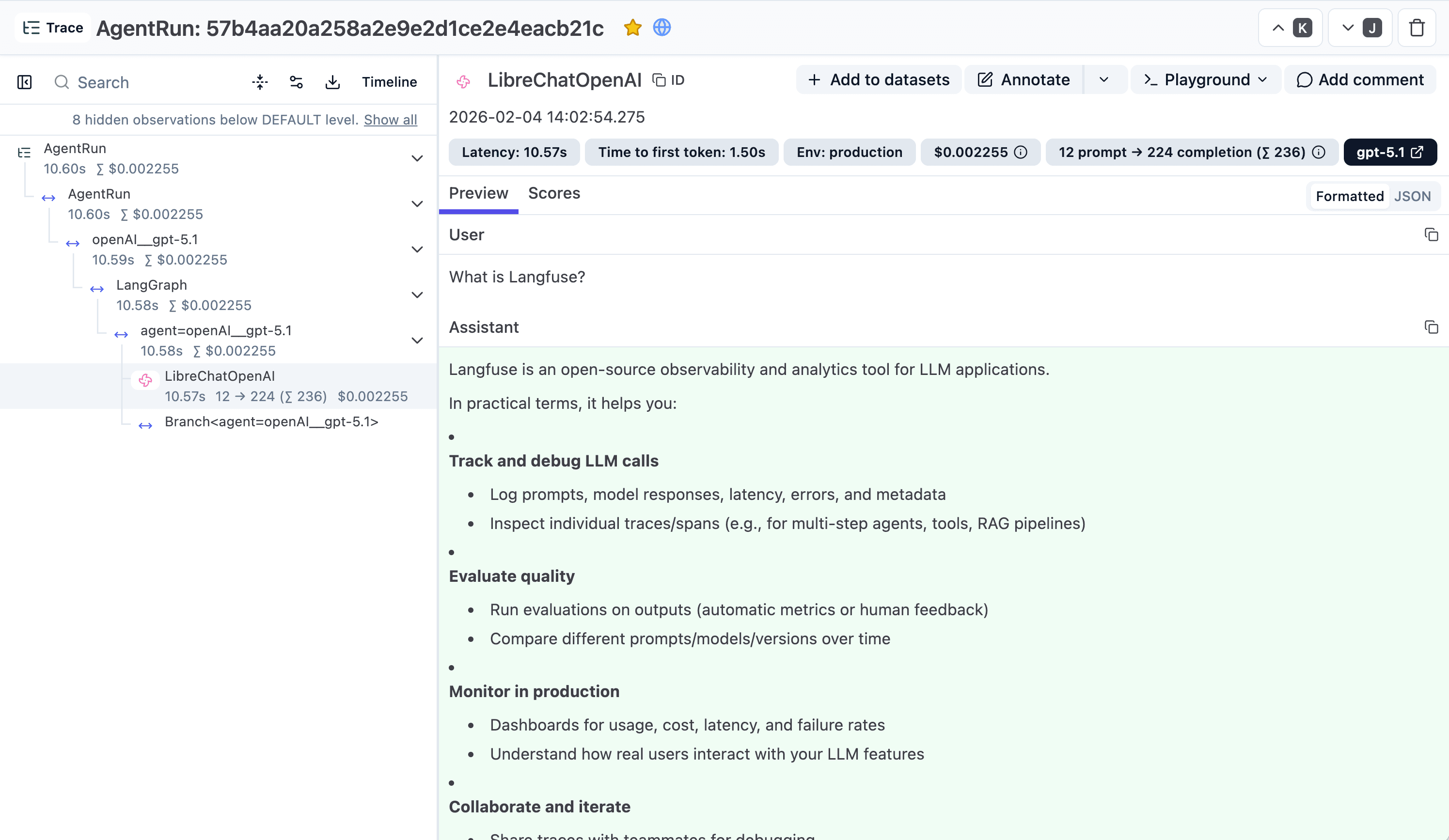
Every chat message now generates a trace in Langfuse. Open your Langfuse project to see prompts, completions, latency, cost, and the full call hierarchy:
Option 2: Deploy the Full Agentic Data Stack
The Agentic Data Stack repository provides a Docker Compose setup that deploys everything together. Langfuse tracing is pre-configured — LibreChat automatically sends traces to the co-deployed Langfuse instance.
Prerequisites
- Docker and Docker Compose v2+
- An API key for at least one LLM provider (OpenAI, Anthropic, or Google)
Clone the repository
git clone https://github.com/ClickHouse/agentic-data-stack.git
cd agentic-data-stack
Prepare the environment
Run the interactive setup script. It generates secure credentials for all services and prompts you to configure LLM API keys:
./scripts/prepare-demo.shAny providers you skip will be set to user_provided, letting users enter their own keys in the LibreChat UI.
You can also generate credentials non-interactively:
USER_EMAIL="you@example.com" USER_PASSWORD="supersecret" USER_NAME="YourName" ./scripts/generate-env.shStart the stack
docker compose up -dThis starts all services: LibreChat, ClickHouse, ClickHouse MCP, Langfuse, PostgreSQL, MongoDB, Redis, MinIO, and supporting services.
Access the services
| Service | URL |
|---|---|
| LibreChat (Chat UI) | http://localhost:3080 |
| Langfuse (Observability) | http://localhost:3000 |
| MinIO Console (Object storage) | http://localhost:9091 |
Sign in with the credentials you configured during setup. The same email and password work for both LibreChat and Langfuse.
View traces in Langfuse
Open Langfuse at http://localhost:3000. The stack pre-configures a project with API keys that LibreChat uses automatically. Every conversation in LibreChat generates a trace in Langfuse, so you can:
- Trace agent workflows — See the full execution path from prompt to tool calls and responses
- Debug issues — Inspect individual LLM calls, including input/output, latency, and errors
- Monitor cost and latency — Track token usage and spend across models
- Evaluate quality — Score outputs with LLM-as-a-judge or human annotations
Reset and start fresh
To tear down all containers and delete all data:
./scripts/reset-all.sh
./scripts/prepare-demo.sh
docker compose up -d
Learn More
- Agentic Data Stack repository — Source code and full documentation
- clickhouse.com/ai — The Agentic Data Stack
- LibreChat documentation — LibreChat setup and configuration
- LibreChat Langfuse integration — Langfuse observability for LibreChat
- ClickHouse MCP server — Connect AI agents to ClickHouse
- Self-host Langfuse — Deploy Langfuse on your own infrastructure